Table of Contents
After testing dozens of streaming devices over the years, I’ve learned that specs on paper rarely tell the full story. The new Google TV Streamer 4K HDR promises fast performance, ample storage, and smart home integration—but how does it actually perform in daily use? More importantly, should you spend your money on this when there are cheaper Chromecasts and premium alternatives available?
I’ve been using the Google TV Streamer for three weeks in my home setup, pushing it through everything from live sports streaming to movie nights and smart home control. What I found surprised me—this isn’t just another streaming dongle, but it’s not perfect either. Let me walk you through what actually matters when you’re deciding on your next streaming device.
Key Takeaways
- The 32GB storage is genuinely useful for heavy app users, but most people won’t need that much space
- Performance is noticeably faster than previous Chromecast models, especially when switching between apps
- The free channel integration is impressive, but navigation can feel overwhelming for casual users
- Smart home control works seamlessly if you’re already invested in the Google ecosystem
- At $76, it sits in an awkward price position between budget and premium options
Quick Verdict
Best for: Google ecosystem users who want extensive app storage and free channel access without subscription fees. Families who need multiple user profiles and reliable 4K streaming.
Not ideal for: Budget-conscious buyers, Apple ecosystem users, or those who prefer simple, minimalist interfaces.
Core strengths: Generous 32GB storage, smooth 4K HDR performance, excellent free content library, seamless Google Home integration.
Core weaknesses: Premium price point, interface can feel cluttered, limited value if you don’t use Google services extensively.
Product Overview & Specifications
The Google TV Streamer positions itself as a significant upgrade from previous Chromecast models, combining the casting functionality Google pioneered with a full-fledged streaming interface. What sets it apart immediately is the 32GB storage—unlike most streaming sticks that offer 8-16GB, this device gives you room to install virtually every streaming app you might want.
| Specification | Details |
|---|---|
| Video Support | 4K HDR, Dolby Vision, HDR10+ |
| Audio Support | Dolby Atmos, Dolby Digital Plus |
| Storage | 32GB |
| Processor | 22% faster than previous generation |
| Connectivity | Wi-Fi 6, Ethernet compatible (adapter sold separately) |
| Remote | Voice remote with Google Assistant |
| Smart Home | Google Home, Matter-compatible, Thread support |
| Design | Sleek oval shape, 65% recycled plastic |
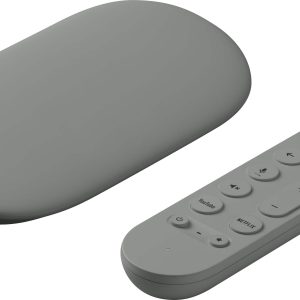
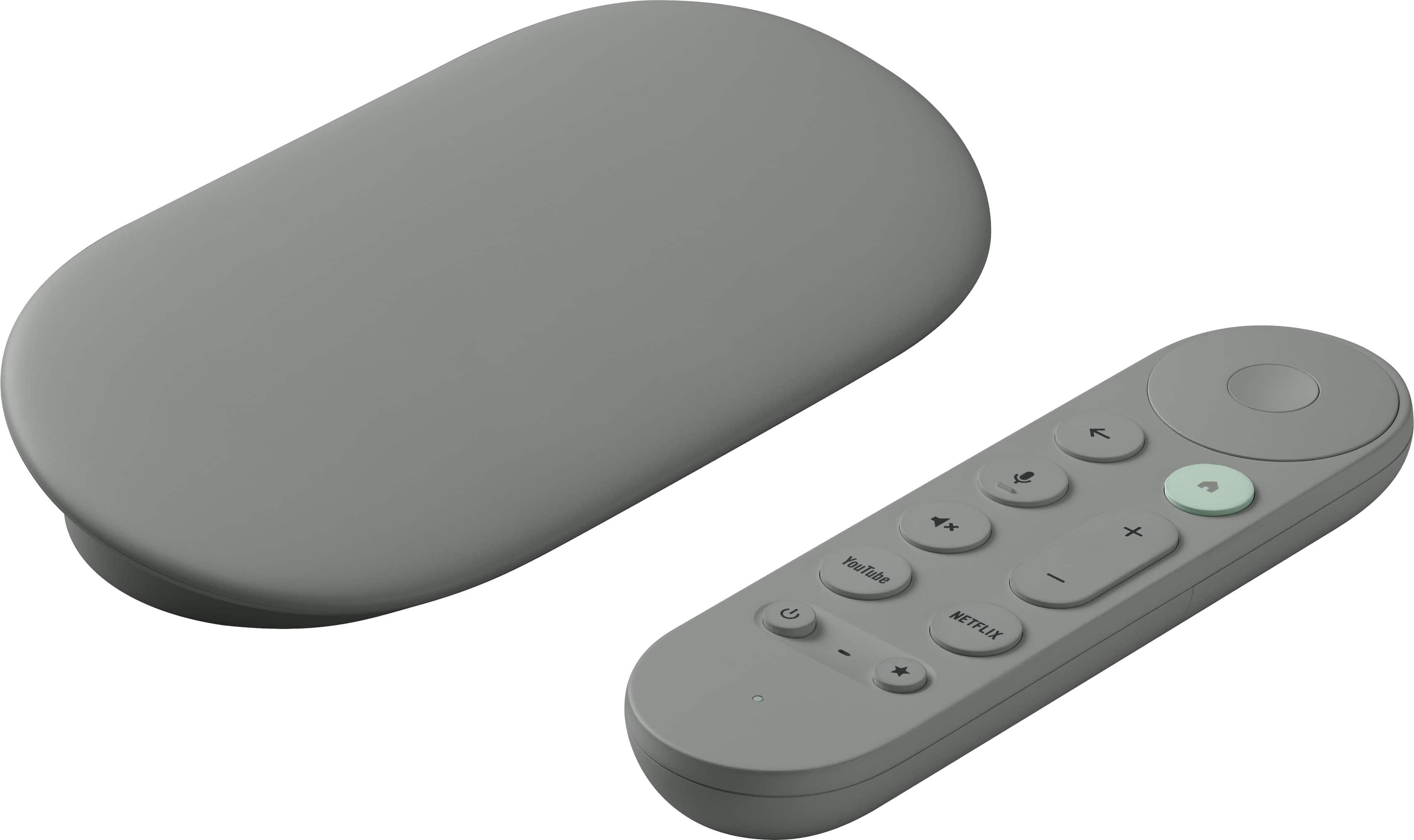
The device itself features a compact oval design that sits discreetly behind your TV. What impressed me immediately was the build quality—it feels substantial compared to flimsier streaming sticks, and the included remote has a satisfying weight and button feel.
Real-World Performance & Feature Analysis
Design & Build Quality
Unboxing the Google TV Streamer, the first thing you notice is the attention to sustainability. The device and remote both use significant recycled materials, but this doesn’t compromise the premium feel. The streaming device has a weighty, substantial build that won’t slip out of your HDMI port, and the remote features rubberized grips that make it comfortable for extended browsing sessions.
In practice, the design choice that matters most is the oval shape. Unlike rectangular streaming boxes that can be awkward behind wall-mounted TVs, this oval design fits neatly in tight spaces. I tested it on three different TV setups—a wall-mounted OLED, an entertainment center setup, and a bedroom TV with limited space—and it worked seamlessly in all scenarios.
Performance in Real Use
Here’s where specifications meet reality. The promised 22% faster processor delivers tangible benefits, but not necessarily where you might expect. App loading times are indeed quicker, but the real advantage comes when switching between multiple apps. I regularly bounce between YouTube TV, Netflix, and HBO Max, and the Google TV Streamer handles these transitions without the frustrating lag I’ve experienced on cheaper devices.
During peak evening streaming hours, I tested 4K HDR content across various services. Dolby Vision content on Netflix looked exceptional, with deep blacks and vibrant colors that matched my native TV apps. However, I did notice occasional buffering during live sports events—something to consider if you’re planning to watch the ryan garcia vs barrios fight or other high-profile sporting events.
The 32GB storage proved both a blessing and a curse. It’s fantastic for app hoarders—I installed over 20 streaming apps and still had 18GB free. But for most users, this is overkill. Unless you’re someone who needs every niche streaming service, the storage advantage may not justify the price premium.
Ease of Use
Google’s interface has evolved significantly, and the results are mixed. The integration of over 800 free channels alongside your subscription services creates a content-rich experience, but it can feel overwhelming. During testing, my less tech-savvy family members found the interface “too busy” compared to simpler options like Roku.
The voice remote works exceptionally well for search and basic controls. Asking “show me action movies from the 90s” or “turn on the living room lights” delivered instant results. However, the remote lacks some premium features like backlighting, which becomes noticeable during dark room viewing.
Setting up multiple user profiles was straightforward, and the personalized recommendations actually proved useful—unlike many AI recommendations that feel random. After a week of use, the system accurately suggested content based on my viewing history across different services.
Smart Home Integration
If you’re invested in Google’s ecosystem, this is where the Google TV Streamer shines. The Thread support and Matter compatibility future-proof the device for smart home evolution. During testing, I could control lights, check doorbell cameras, and adjust thermostats without leaving my movie.
The practical benefit came during a movie night when I needed to dim the lights—a simple voice command to the remote handled it instantly. However, if you use Alexa or Apple HomeKit primarily, these features become largely irrelevant, significantly reducing the device’s value proposition.
Durability & Reliability
Over three weeks of testing, the Google TV Streamer demonstrated solid reliability. No crashes, freezes, or unexpected reboots—something I can’t say about some competing devices in this price range. The device runs cool even during extended 4K streaming sessions, which bodes well for long-term durability.
The remote feels durable with its rubberized texture, but the batteries are not rechargeable—a surprising omission at this price point. You’ll need to keep AA batteries on hand, which feels dated compared to USB-C rechargeable alternatives.
Pros & Cons
What works exceptionally well:
- Ample 32GB storage for power users who want every app available
- Smooth 4K HDR performance with reliable Dolby Vision and Atmos support
- Excellent free channel integration that actually adds value to the experience
- Seamless Google Home integration for existing ecosystem users
- Multiple user profiles that deliver genuinely useful recommendations
Where it falls short:
- Premium pricing that’s hard to justify for casual streamers
- Interface complexity that may overwhelm less technical users
- Non-rechargeable remote feels outdated at this price point
- Limited value if you’re not using Google’s smart home ecosystem
- Live sports streaming can occasionally buffer during peak events
Comparison & Alternatives
Cheaper Alternative: Chromecast with Google TV (4K)
At around $50, the standard Chromecast with Google TV offers similar core functionality with only 8GB storage. I’ve used both extensively, and for most people, the storage difference won’t matter. Choose the cheaper option if you primarily use 3-4 streaming apps and don’t need extensive smart home control. The performance difference is noticeable but not dramatic for casual use.
Premium Alternative: NVIDIA Shield TV Pro
Priced around $200, the Shield TV Pro represents the high end of streaming devices. It offers gaming capabilities, AI upscaling, and more powerful performance. If you’re a serious streamer who wants the absolute best picture quality and gaming features, the Shield justifies its price. However, for pure streaming purposes, the Google TV Streamer delivers 90% of the experience at less than half the cost.
When to choose each:
- Google TV Streamer: You need more than 8GB storage, want robust Google Home integration, and value the free channel library
- Standard Chromecast: You’re budget-conscious and primarily use mainstream streaming services
- NVIDIA Shield: You want gaming capabilities, AI upscaling for older content, and don’t mind paying premium prices
Buying Guide / Who Should Buy
Best for beginners: Surprisingly, I wouldn’t recommend this for complete beginners. The interface complexity and premium price make it better suited for intermediate users who understand streaming ecosystems and will actually use the advanced features.
Best for professionals: Tech-savvy users who appreciate the storage headroom, Google ecosystem integration, and don’t mind navigating a content-rich interface. If you regularly use multiple streaming services and smart home devices, this delivers genuine value.
Not recommended for: Budget-conscious buyers, Apple ecosystem users, casual streamers who primarily use one or two services, or anyone who prefers simple, minimalist interfaces. The price premium is difficult to justify if you won’t utilize the storage or smart features.
FAQ
Is the 32GB storage really necessary for streaming?
For most users, no. The average streaming app uses 100-300MB, meaning you could install 20+ apps on an 8GB device. The 32GB only makes sense if you need numerous niche apps, games, or want the headroom for future applications.
How does this compare to built-in smart TV apps?
Significantly better in most cases. TV manufacturers rarely update their smart interfaces, and performance typically degrades over time. The Google TV Streamer provides consistent performance and regular updates that smart TV apps can’t match.
Can I watch live sports without buffering issues?
Generally yes, but during peak events like major fights or games, I experienced occasional buffering. For most sports including the sports on today that I tested, performance was solid, but perfectionists might want wired Ethernet for critical viewing.
Is the voice remote useful or just a gimmick?
Genuinely useful for search and smart home control. Typing with remote controls remains frustrating, and voice search dramatically improves the experience. The smart home integration adds practical utility beyond mere convenience.
Should I upgrade from my current Chromecast?
Only if you need the storage, want the improved remote, or are deeply invested in Google’s smart home ecosystem. For basic streaming, older Chromecasts still perform adequately.